
Shopping for a budget wrist dive computer means balancing display readability, algorithm transparency, and button usability — usually giving up something at this price. The Mares Puck 4 earns my best overall pick for combining a large segment display, three gas capability, and a rechargeable battery in a watch-style format that punches above its price class. If you want the easiest possible entry into dive computing, the Cressi Leonardo 2.0 keeps things deliberately simple, while the Shearwater Peregrine Adventures Edition sits at the top of the budget bracket with a color screen and the best software in this lineup. The main tradeoff you will face here is between single-gas simplicity and multi-gas flexibility, and between replaceable batteries versus rechargeable ones. Keep reading for the full breakdown of all nine models.

Get travel and outdoor gear delivered free with Prime
- Fast, free delivery on millions of items
- Prime Video, Amazon Music and more included
- Member-only deals all year
Complete the kit



Key Takeaways
- The Mares Puck 4 separated itself as best overall because it is the only budget pick in this lineup that pairs a rechargeable battery with three-gas nitrox support — most rivals force you to choose one or the other.
- The Shearwater Peregrine Adventures Edition is the most expensive model here but the cheapest way into Shearwater’s ecosystem, making it the strongest long-term value despite the higher upfront cost.
- Only two models in this comparison offer multiple gas switching; the rest are single-gas or dual-nitrox machines, which is fine for new divers but limiting for anyone heading toward technical diving.
- Freedivers should skip every scuba-focused model on this list and go straight to the SEAC Partner, the only dedicated freediving computer in the roundup.
- Button-based navigation quality varied more than any other factor — entry-level models like the Genesis Centauri and Mares Puck Pro EZ trade menu simplicity for lower cost, which frustrates divers wearing gloves.
| TUSA TC1 IQ1301 Dive Wrist Computer |  | Best for Low-Visibility Diving | Model: IQ1301 (TC1) | Battery: Rechargeable lithium-ion | Battery Life: Up to 25 dives per charge; up to 3 months standby | VIEW ON AMAZON | See Our Full Breakdown |
| SEAC Screen Scuba Wrist Dive Computer |  | Best for Cold-Water Divers | Dive Modes: Scuba, gauge, freediving | Dive Algorithm: Bühlmann ZHL-16C | Gas Mixes: 1 or 2 air or Nitrox mixes | VIEW ON AMAZON | See Our Full Breakdown |
| Cressi Leonardo 2.0 Scuba Dive Computer Watch, Black/Yellow |  | Best for Beginners | Model: Leonardo 2.0 | Dive Modes: Air, Nitrox, Gauge | Interface: Single-button | VIEW ON AMAZON | See Our Full Breakdown |
| GENESIS Centauri Dive Wrist Mount Computer |  | Bare-Bones Budget Option | Brand: GENESIS | Model: GWC-01 (Centauri) | Part Number: GWC-01 | VIEW ON AMAZON | See Our Full Breakdown |
| Mares Puck 4 Wrist Dive Computer |  | Best Value for Growing Divers | Algorithm: Bühlmann ZH-L16C with adjustable gradient factors | Gas Support: Up to three gases | Display: Segment display with chip-on-glass technology | VIEW ON AMAZON | See Our Full Breakdown |
| Shearwater Research Peregrine Adventures Edition Dive Computer |  | Best Premium Budget Pick | Interface: Two-button, state-aware menu structure | Buttons: 316 stainless steel | Battery life: Up to ~30 hours per charge at medium brightness | VIEW ON AMAZON | See Our Full Breakdown |
| Seac Screen Scuba Wrist Dive Computer |  | Best for Easy Readability | Type: Wrist dive computer | Gas mixes: 1 or 2 | Modes: Scuba, Freediving | VIEW ON AMAZON | See Our Full Breakdown |
| SEAC Partner Wrist-Mount Freediving Computer | 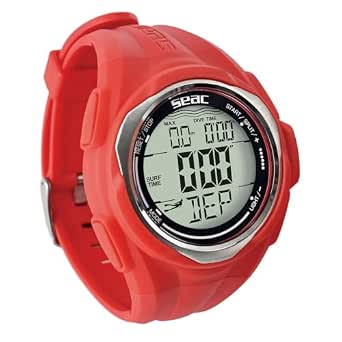 | Best for Freedivers on a Tight Budget | Type: Wrist-mount freediving computer | Water resistance: 100 m | Battery: CR2032 replaceable | VIEW ON AMAZON | See Our Full Breakdown |
| Mares Puck Pro EZ Wrist Scuba Dive Computer |  | Best Value for New Scuba Divers | Model: 414177 | Gas compatibility: Single gas Nitrox 21%-50% | Algorithm: Buhlmann ZH-L16C with dual gradient factors | VIEW ON AMAZON | See Our Full Breakdown |
More Details on Our Top Picks
TUSA TC1 IQ1301 Dive Wrist Computer
What separates the TC1 from most budget wrist computers is its triple-alarm system — audible, visual, and vibrating. That vibration alert is the real differentiator: if you dive in murky water or with a photographer who hates beeping computers, this model lets you know you’re ascending too fast without announcing it to everyone nearby. Compared with the Cressi Leonardo 2.0, which relies only on visual and audible alerts, the TC1 covers more sensory channels, and its rechargeable battery removes the hassle and cost of swapping coin cells between trips. The Altitude Smart Mode is a genuine plus for anyone diving mountain lakes. The tradeoff is runtime: roughly 25 dives per charge means a liveaboard week demands a charger and a power source, which the Leonardo’s replaceable battery never worries about.
Pros:- Vibration alarm alerts you without distracting nearby dive partners
- Rechargeable lithium-ion battery eliminates replacement battery costs
- Backlit display supports night and low-light diving
- Altitude Smart Mode adjusts automatically for high-elevation dives
Cons:- Battery life of roughly 25 dives per charge requires frequent recharging on extended trips
- Standby time drops quickly if the backlight is used heavily
Best for: Divers who frequent low-visibility sites or travel to altitude and want silent, multisensory alerts
Not ideal for: Liveaboard or remote-trip divers who can’t recharge every couple of days and prefer a user-replaceable battery
- Model:IQ1301 (TC1)
- Battery:Rechargeable lithium-ion
- Battery Life:Up to 25 dives per charge; up to 3 months standby
- Display:Backlit, up to 10-second backlight duration
- Modes:Altitude Smart Mode, Free Dive Mode, Vibration Mode
- Alarms:Audible, visual, and vibrating for ascent rate, max depth, NDL, and safety stop
Our verdict“This pick makes the most sense for divers who prioritize silent alerts and altitude capability over multi-day battery independence.”
SEAC Screen Scuba Wrist Dive Computer
The SEAC Screen earns its place through glove-friendly design that most budget computers ignore. Its two large front buttons work with thick dry-suit gloves, and the long strap fits comfortably over suit material — something the Mares Puck 4 and its single-button interface can’t claim when you’re at depth with numb fingers. Under the hood it runs the Bühlmann ZHL-16C algorithm and handles two Nitrox mixes, which gives it more technical headroom than the Cressi Leonardo 2.0 at a similar budget tier. The adjustable contrast and brightness display is genuinely useful in dark northern waters. The tradeoff is that two buttons still means a menu-driven interface, and it lacks the Bluetooth connectivity the Puck 4 offers, so logbook transfers mean manual entry or additional hardware.
Pros:- Two front buttons are operable while wearing thick gloves
- Large display with adjustable contrast and brightness for dark water
- Bühlmann ZHL-16C algorithm with support for two Nitrox mixes
- Long strap fits over a dry suit without extensions
Cons:- No Bluetooth connectivity, so dive logs can’t sync to a phone
- Two-button menus still take practice to navigate efficiently
Best for: Cold-water and dry-suit divers who need glove-operable controls and a long strap
Not ideal for: Divers who want wireless logbook syncing — there’s no Bluetooth app connectivity here
- Dive Modes:Scuba, gauge, freediving
- Dive Algorithm:Bühlmann ZHL-16C
- Gas Mixes:1 or 2 air or Nitrox mixes
- Maximum Oxygen:99%
- Controls:Two front buttons, glove-friendly
- Display:Adjustable contrast and brightness
- Alarms:MOD violation, decompression stop, ascent speed
- Extras:NDL dive planner; depth gauge and stopwatch in gauge mode
Our verdict“The strongest choice in this lineup for cold-water divers who value glove-ready controls over wireless connectivity.”
Cressi Leonardo 2.0 Scuba Dive Computer Watch, Black/Yellow
The Leonardo 2.0 remains the benchmark for budget simplicity, and this listing is the approachable entry point of the roundup. Its single-button interface is the friendliest learning curve here — a new diver can master it in an afternoon, whereas the Mares Puck 4 buries multigas settings and gradient factors behind the same one button and expects more of you. Air, Nitrox, and Gauge modes cover everything a new Open Water diver will need for years, and pairing with iOS and Android makes reviewing dive logs painless after class. The honest tradeoff: that one button means slower menu navigation once you start tweaking settings, and the segment display shows less information at a glance than the SEAC Screen’s adjustable display. This is a computer you may outgrow if you move into technical diving.
Pros:- Single-button interface is the easiest to learn in this lineup
- Air, Nitrox, and Gauge modes cover recreational needs
- Bluetooth pairing with iOS and Android simplifies log management
- Italian-made build with clear visual and audible safety alarms
Cons:- Single-button navigation becomes tedious when adjusting settings mid-trip
- No multigas or advanced algorithm customization for technical growth
Best for: Newly certified divers who want a simple, affordable first computer they can master quickly
Not ideal for: Advancing divers planning decompression or technical profiles — the feature set stops at basic Nitrox
- Model:Leonardo 2.0
- Dive Modes:Air, Nitrox, Gauge
- Interface:Single-button
- Alerts:Visual and audible alarms
- Connectivity:iOS and Android compatible; USB and infrared data transfer
- Color:Black/Yellow
Our verdict“The sensible first computer for recreational divers who value simplicity today over expandability tomorrow.”
GENESIS Centauri Dive Wrist Mount Computer
Full transparency: the GENESIS Centauri is the thinnest on documented features in this roundup, and that alone shapes where it belongs. Where the Cressi Leonardo 2.0 and SEAC Screen publish their algorithms, gas support, and alarm systems, the Centauri’s listing offers little beyond its wrist-mount format and gauge-category placement. That said, a basic wrist-mounted unit still serves a real purpose: as a cheap backup computer or gauge for a spare gear bag, where a failure of your primary unit shouldn’t end a dive trip. Compared with the Mares Puck 4, which spells out its Bühlmann ZH-L16C algorithm and three-gas support, the Centauri asks you to buy on trust. Anyone shopping for a primary computer should verify specifications with the seller before ordering.
Pros:- Wrist-mounted format keeps it compact and travel-friendly
- Low-cost entry point for a secondary unit
- Simple proposition as a backup gauge
- Lightweight for slipping into a travel kit
Cons:- Listing provides almost no functional specifications, making pre-purchase evaluation difficult
- No documented algorithm, gas support, or connectivity details to compare against rivals
Best for: Divers who want an inexpensive secondary or backup wrist unit for the gear bag
Not ideal for: Anyone shopping for a primary dive computer — the sparse documentation makes informed comparison impossible
- Brand:GENESIS
- Model:GWC-01 (Centauri)
- Part Number:GWC-01
- UPC:617209417555
- Mounting:Wrist-mounted
- Included Components:1 wrist computer unit
Our verdict“Only worth considering as a low-cost backup — confirm full specifications with the seller before relying on it as a primary computer.”
Mares Puck 4 Wrist Dive Computer
The Puck 4 is the budget pick with the clearest growth path. Its Bühlmann ZH-L16C algorithm with adjustable gradient factors and three-gas support give it technical-leaning capabilities that the Cressi Leonardo 2.0 simply doesn’t offer — you can start recreational and progress into multigas diving without buying a new computer. Bluetooth logbook transfer also puts it ahead of the SEAC Screen, which requires manual handling of dive data. The compromises are familiar Mares traits: everything runs through one button, so navigating menus is slower than the SEAC’s two-button layout, and the segment display — while crisp and readable — shows less contextual detail than a graphical screen like the Shearwater Peregrine. For a diver who wants algorithm control and multigas readiness at a budget price, those are acceptable tradeoffs.
Pros:- Adjustable gradient factors on the Bühlmann ZH-L16C algorithm allow conservative-to-aggressive tuning
- Supports up to three gases for future technical growth
- Bluetooth transfers dive logs straight to a smart device
- Built-in decompression planner and digital logbook add planning value
Cons:- Single-button navigation is slower than two-button rivals like the SEAC Screen
- Segment display shows less detailed information than graphical-screen computers
Best for: Recreational divers planning to progress into Nitrox and multigas diving without replacing their computer
Not ideal for: Divers who want at-a-glance graphical data or fast menu navigation — the segment display and single button limit both
- Algorithm:Bühlmann ZH-L16C with adjustable gradient factors
- Gas Support:Up to three gases
- Display:Segment display with chip-on-glass technology
- Controls:Single-button interface
- Connectivity:Bluetooth
- Features:Decompression dive planner, digital logbook, resettable average depth
- Style:Wrist-mounted
- Color:Black/Olive
Our verdict“The smartest budget buy for divers who want room to grow into multigas diving without paying premium-computer prices.”
Shearwater Research Peregrine Adventures Edition Dive Computer
Within the budget wristdive computer field, the Peregrine Adventures Edition sits at the top of the price ladder while still costing less than technical dive computers. What justifies that premium is polish: a state-aware two-button menu that reorders options based on what you’re doing, 316 stainless steel buttons that won’t corrode, and roughly 30 hours of battery per charge — weeks of diving without thinking about power. Compared with the Mares Puck Pro EZ, the Peregrine trades single-button minimalism for a far more refined interface and a color screen experience that makes mid-dive decisions faster. The wireless USB charging station is convenient, though it means you’re tethered to a charger rather than swapping a coin cell like the SEAC Partner.
Pros:- State-aware two-button menu makes navigation fast and intuitive underwater
- Around 30 hours of battery life per charge at medium brightness
- 316 stainless steel buttons resist corrosion in salt water
- Wireless USB charging station included
Cons:- Priced near the top of the budget category
- No user-replaceable battery — a dead unit mid-trip means finding a charger
Best for: Recreational divers who want a polished, travel-friendly computer they can grow with for years
Not ideal for: Trimix or technical divers — this is an air/Nitrox machine with no mixed-gas expansion
- Interface:Two-button, state-aware menu structure
- Buttons:316 stainless steel
- Battery life:Up to ~30 hours per charge at medium brightness
- Charging:USB wireless charging station included
- Package dimensions:6.69 × 4.45 × 4.33 inches
Our verdict“Buy this if you want the most refined experience in the budget class and can stretch your budget to the top of it.”
Seac Screen Scuba Wrist Dive Computer
Where the Cressi Leonardo 2.0 leans on a compact display, the Seac Screen goes the opposite direction: an extra-large face with big numbers that puts depth, time, and gas data all on one screen at once. That single-glance layout is the whole point — divers who’ve squinted at segmented screens mid-dive will immediately understand the appeal. The ultra-bright adjustable backlight makes night and low-visibility diving far less stressful, and the user-replaceable battery lasting around three years beats the recharge-only Peregrine Adventures Edition for set-and-forget convenience. It also covers both scuba (one or two gas mixes) and freediving, giving it more range than the scuba-only Mares Puck Pro EZ. The tradeoff is that heavy backlight use eats into that battery life faster than Seac’s estimates suggest.
Pros:- Extra-large display shows all critical data on one screen
- Supports both scuba (1-2 gas mixes) and freediving modes
- User-replaceable battery lasting around 3 years
- Proven durable in high-use settings like dive schools
Cons:- Ultra-bright backlight drains the battery faster for frequent night divers
- Large footprint feels clunky as an everyday watch
Best for: Divers with aging eyes or anyone who wants every key metric visible in one glance
Not ideal for: Travel-minimalists — the oversized screen makes it bulky compared with slim watches like the SEAC Partner
- Type:Wrist dive computer
- Gas mixes:1 or 2
- Modes:Scuba, Freediving
- Battery:User replaceable, ~3 year life
- Backlight:Adjustable, ultra bright
- Brand:Seac
Our verdict“This pick makes the most sense for divers who prioritize instant readability over compact wrist presence.”
SEAC Partner Wrist-Mount Freediving Computer
The SEAC Partner is the specialist in this lineup: it’s built purely for breath-hold diving, tracking depth, dive and ascent speed, temperature, dive time, and surface interval on one backlit screen. Compared with the Seac Screen, which handles freediving as a secondary mode alongside scuba, the Partner strips everything down to what a spearfisher or freediver actually checks between dives. Storage for up to 99 recorded dives plus a stopwatch and countdown timer make it genuinely useful for training sessions, and the slim wrist mount disappears when you’re swimming. It can’t compete with full scuba computers — no decompression data, no gas switching — but at this price point that’s the point. The CR2032 battery is cheap to replace, though you’ll want spares in your dive bag since there’s no low-tech fallback.
Pros:- All key freediving metrics displayed on one screen
- Records up to 99 dives for training review
- Stopwatch and countdown functions built in
- Backlit display for low-light sessions
Cons:- CR2032 battery must be replaced rather than recharged
- No scuba, decompression, or gas-mix capability
Best for: Spearfishers and freedivers who want depth, timing, and surface-interval tracking without paying for scuba features
Not ideal for: Scuba divers — there is no decompression or gas-mix functionality at all
- Type:Wrist-mount freediving computer
- Water resistance:100 m
- Battery:CR2032 replaceable
- Dive recording capacity:Up to 99 dives
- Display:Backlit
- Functions:Stopwatch and countdown
- Warranty:1 year retailer warranty
Our verdict“If your dives start with a breath instead of a tank, this is the cheapest capable tool in the roundup.”
Mares Puck Pro EZ Wrist Scuba Dive Computer
The Puck Pro EZ nails the entry-level scuba brief: a high-contrast display showing depth, time, temperature, and no-deco limits, driven by a single button that removes the learning curve entirely. New divers don’t need four buttons and they don’t need trimix — and Mares leaned into that. The Buhlmann ZH-L16C algorithm with gradient factors is the same class of decompression modeling found in pricier units, which is genuinely uncommon at this price. Compared with the Seac Screen, the Puck gives you Bluetooth log transfers instead of a bigger screen — a fair trade for divers who review their logs on a phone. The replaceable battery is rated for up to 100 dives, so ownership costs stay low. The limitation is clear: single-gas Nitrox (21–50%) only, with no path to technical diving.
Pros:- Buhlmann ZH-L16C algorithm with gradient factors, rare at this price
- Single-button operation with almost no learning curve
- Bluetooth transfers dive logs to a phone or tablet
- Replaceable battery rated for up to 100 dives
Cons:- Single-gas Nitrox only — no trimix or multiple gas support
- Single button makes editing settings slower than multi-button rivals
Best for: Open Water students and casual recreational divers who want dependable Nitrox diving at the lowest sensible price
Not ideal for: Divers planning to move into technical or trimix diving — the single-gas ceiling is a hard stop
- Model:414177
- Gas compatibility:Single gas Nitrox 21%-50%
- Algorithm:Buhlmann ZH-L16C with dual gradient factors
- Interface:Single-button
- Battery:Replaceable, up to 100 dives
- Connectivity:Bluetooth
- Display data:Depth, decompression, temperature, time
Our verdict“The smartest first scuba computer here for anyone who wants pro-grade decompression math without pro-grade cost.”

How We Picked
I evaluated each computer against the factors that actually shape a budget purchase: display readability underwater and at angle, gas capability (single gas, dual nitrox, or multi-gas switching), battery architecture (user-replaceable versus rechargeable), and everyday wearability as a wrist device you might keep on between dives. Ease of use carried heavy weight — a budget computer that buries settings behind confusing button sequences creates real risk when you are task-loaded at depth or wearing thick gloves.
Ranking also reflected upgrade headroom. Models that support download and desktop logbook software ranked above closed ecosystems, because divers who log and review their profiles improve faster. Finally, I placed a premium on brand support and serviceability: a budget computer is only a good deal if it lasts many seasons, and manufacturers with established service networks earned the top spots over similarly specced but harder-to-support alternatives.
Factors to Consider When Choosing Budget Wristdive Computer
A budget wrist dive computer is a safety instrument first and a gadget second, so the cheapest option is rarely the best-value one. These are the factors I would weigh before spending money.Display Type Matters More Than You Think
Budget computers split into two camps: segmented LCD displays (like the Cressi Leonardo, Mares Puck Pro EZ, and Genesis Centauri) and full-matrix or color screens (like the Shearwater Peregrine). Segmented displays are extremely readable in bright sun, sip battery power, and show only fixed information layouts — which is why they dominate the entry level. Matrix screens can graph your depth profile and use customizable layouts, but they cost more and some struggle in direct glare. If you dive mostly in clear, shallow tropical water, a segmented display will serve you fine. If you dive in low visibility or want to see your profile in real time, a matrix screen justifies the extra cost. Try reading each display type at an angle and through a mask before committing.
Gas Capability: Buy for the Diver You Will Become
The most common budget-buying mistake is purchasing a single-gas computer right before falling in love with nitrox or advanced diving. A single-gas unit handles air and often one nitrox mix, which covers open-water certification diving completely. Dual or three-gas computers like the Mares Puck 4 or Seac Screen let you switch mixes mid-dive, which matters for deeper recreational profiles and future training. Gas switching capability costs relatively little extra at this level, so I would buy it even if you do not need it yet — unless you are certain you will stay a vacation-only diver. What you should not do is buy a scuba computer expecting it to track freediving; that requires dedicated apnea algorithms like those in the SEAC Partner.
Replaceable Battery Versus Rechargeable
A user-replaceable coin cell means you can swap batteries on a liveaboard with a coin and an o-ring kit, and the computer runs for seasons per cell. A rechargeable battery like the one in the Mares Puck 4 or Peregrine means no o-ring maintenance and consistent brightness, but you must remember to charge it, and the battery eventually ages out of the device. Travel divers often prefer replaceable cells because a dead rechargeable mid-trip is a lost dive day. Weekend local divers usually prefer rechargeables because they never hunt for a CR2450 at a dive shop. Neither approach is wrong — match it to your diving rhythm, and check whether the model requires a dealer battery service, which adds long-term cost.
Buttons, Gloves, and Usability
At this price, interface quality varies wildly, and it is the factor divers complain about most after purchase. Single-button computers are cheap to build but force you through long scroll sequences to change a setting — workable bare-handed, miserable in 5mm gloves. Multi-button interfaces let you navigate directly to what you need, which matters most during pre-dive checks when you are rushed. Before buying, watch how many presses it takes to set a nitrox percentage and to reach the logbook. Also check button size and recess depth; small recessed buttons that work fine in the shop can become nearly unusable with cold-water gloves. This is where spending slightly more up front pays back every single dive.
Connectivity and Logbook Support
Some budget computers are closed systems with no data download, while others offer Bluetooth or USB logbook transfer to desktop and mobile apps. Downloading your profiles is not just about logging bragging rights — reviewing your ascent rates and safety stops is one of the fastest ways to become a better diver, and many instructors expect logged data during advanced courses. Manufacturers also differ in software longevity: established brands keep their apps updated for a decade, while smaller brands sometimes abandon support within a few years. If you plan to progress through advanced or rescue certifications, treat download capability as a requirement, not a nice-to-have. It is one of the cheapest upgrades on this list.
Algorithm Conservatism and Brand Support
Every computer here runs a version of the Bühlmann or RGBM-style decompression algorithm, but the default conservatism differs between brands, and that affects how long your no-stop time runs. A more conservative default is a sensible choice for older divers, cold-water divers, or anyone making repeated dives over multiple days. More aggressive defaults give longer bottom times but assume ideal conditions. Just as relevant is after-sales support: budget brands with weak service networks can leave you buying a whole new computer when a sensor or battery seal fails. Established manufacturers with dealer networks consistently rank higher on this criterion, and I weighted it heavily in the rankings below.
Frequently Asked Questions
Can I use a budget dive computer for freediving or spearfishing?
Most scuba computers in this roundup are poor freediving tools because their sampling rates and algorithms are built for slow scuba profiles, and some will not track apnea dives at all. The exception here is the SEAC Partner, which is a dedicated freediving computer with apnea-specific depth sampling, surface interval tracking, and ascent-rate alarms. If you do both sports, your best route is either buying both a budget scuba unit and the Partner, or stepping up to a premium hybrid computer outside this price bracket. Mixing freediving immediately after scuba also carries real decompression risk, so separate devices help you keep the two activities properly separated. What you should not do is assume a scuba computer’s gauge mode makes it freediving-safe — it does not.
Is a rechargeable or replaceable battery better for a dive computer?
It depends on your diving pattern more than any inherent superiority. Replaceable coin cells, found in the Cressi Leonardo 2.0 and Mares Puck Pro EZ, run for one to three seasons and can be swapped anywhere — ideal for liveaboards and remote travel where charging is unreliable. Rechargeable batteries, like those in the Mares Puck 4 and Shearwater Peregrine, deliver consistent screen brightness and no o-ring handling, but a forgotten charge means a missed dive and the cell degrades over years. Rechargeable models also tend to support brighter, more capable displays, which is partly why the Puck 4 ranked so well here. If you travel with a power bank and dive weekly, rechargeable wins; if you dive on vacation twice a year, replaceable wins.
Do I need multi-gas support if I am a new diver?
Not today, but probably within two or three seasons if you keep diving — and that is exactly why I ranked gas-capable models higher. Most newly certified divers start on air, move to nitrox within a year, and then start planning deeper or longer profiles where switching capability extends bottom time safely. A single-gas computer that locks you out of that progression becomes a paperweight you outgrow, while a three-gas unit like the Mares Puck 4 or the dual-mix Seac Screen keeps working as your diving evolves. The price difference at this level is small enough that I would buy the headroom unless you are certain you will remain an occasional resort diver. The exception is the Cressi Leonardo 2.0, whose deliberate simplicity is genuinely the right call for divers who want zero menus to worry about.
Are cheap dive computers safe compared to expensive ones?
Yes — every model in this roundup runs a validated decompression algorithm, and the math keeping you safe is essentially the same as in computers costing several times more. What you give up at the budget level is convenience and headroom, not safety: smaller or monochrome screens, fewer gas options, shorter battery toolkits, and less polished software. The Shearwater Peregrine demonstrates this clearly — its algorithms and reliability match its far more expensive siblings, and the budget price mostly reflects fewer technical features. The genuine safety differentiators are usability factors like readable displays and glove-friendly buttons, because a computer you can misread or fumble is dangerous regardless of its price. Buy from an established brand so firmware updates and service stay available, and any computer here will serve you safely.
What is the difference between the Mares Puck 4 and the Mares Puck Pro EZ?
The Puck Pro EZ is the traditional entry point: a large one-button computer with a replaceable battery, single-gas with nitrox, and a famously simple interface that does one thing well. The Puck 4 is its modern successor in a slimmer watch-style case, adding a rechargeable battery, Bluetooth logbook download, and three-gas capability — making it the more future-proof purchase for divers who expect to progress. The Pro EZ costs less and its bigger display is arguably easier to read for basic recreational diving, while the Puck 4 covers you through advanced nitrox training. If this is your first computer and you dive a few times a year, the Pro EZ is honestly enough. If you dive regularly or plan certifications, the Puck 4 is worth the step up, which is exactly why I ranked it best overall.
Conclusion
Matching the right budget wrist dive computer to your situation comes down to where you are in the sport and where you are heading. For most divers, the Mares Puck 4 is the best overall choice — it is the rare budget model that handles three gases, downloads your logs, and recharge without ever feeling cheap. If pure value is the goal, the Mares Puck Pro EZ delivers dependable single-gas computing at the friendliest price in the lineup, and the Genesis Centauri covers similar ground for divers who prefer a larger traditional display.
Beginners get the friendliest start with the Cressi Leonardo 2.0, whose pared-back interface removes the settings anxiety that overwhelms many new divers. The Shearwater Peregrine Adventures Edition is the premium pick — the most money you can spend in this bracket, and the one I would recommend to anyone who dives often, since its color display and software outclass everything else here. Freedivers and spearos should go straight to the SEAC Partner, while divers wanting a middle path between the Leonardo and the Peregrine will find the Seac Screen and TUSA TC1 fill that gap nicely. Whatever you choose, buy for the diver you will be in three years, not just the diver you are today.
Halloween Picks
halloween
As an affiliate, we earn on qualifying purchases.