


A cruise travel router can share a ship’s Wi-Fi with several personal devices, but it cannot bypass the cruise line’s login rules or improve the ship’s underlying internet connection. My best overall pick is the GL.iNet Beryl AX, which balances portable Wi-Fi 6 hardware with traveler-focused network controls. The TP-Link Roam 6 AX3000 is a strong alternative for travelers prioritizing Wi-Fi 6 speed, while the GL.iNet Slate AX suits people who want VPN features. The main tradeoffs are ease of setup, device compatibility, size, and whether newer Wi-Fi features matter on a ship’s shared connection. Read on for the full breakdown and guidance on choosing a router that fits your trip.

Get travel and outdoor gear delivered free with Prime
- Fast, free delivery on millions of items
- Prime Video, Amazon Music and more included
- Member-only deals all year
Complete the kit


Key Takeaways
- The GL.iNet Beryl AX is the best overall fit: it offers a practical balance of travel-oriented controls, Wi-Fi 6, and portability without making Wi-Fi 7 the main reason to buy.
- Wi-Fi 7 is a future-facing feature, not a ship-internet speed fix: the Slate 7, Beryl 7, Roam 7, and ASUS RT-BE58 Go may suit newer-device households, but the ship’s connection remains the limiting factor.
- GL.iNet models stand out for network control: Slate AX, Slate Plus, Beryl AX, and related options are more compelling for travelers who want VPN and configurable networking than for people seeking the simplest setup.
- TP-Link Roam models offer a clearer mainstream choice: the AX3000 versions emphasize higher Wi-Fi 6 capability, while the AX1500 versions are the more restrained pick for basic device sharing.
- The N300 Nano and Mango are compact but limited: their older wireless standards make them best for light, simple use rather than a cabin full of newer devices or demanding local network tasks.
| TP-Link Roam 6 AX3000 Dual-Band Wi-Fi 6 Travel Router (TL-WR3002X) |  | Best Overall for Ship Wi-Fi Sharing | Model: TL-WR3002X | Wi-Fi: Wi-Fi 6, dual-band | Wireless class: AX3000 | VIEW ON AMAZON | See Our Full Breakdown |
| GL.iNet Slate AX Wi-Fi 6 Travel Router with VPN |  | Best for OpenWrt Customization | Model: GL-AXT1800 | Wi-Fi: Wi-Fi 6, dual-band | Combined data rate: Up to 1800 Mbps | VIEW ON AMAZON | See Our Full Breakdown |
| GL.iNet GL-BE3600 Slate 7 Wi-Fi 7 Travel Router with Touchscreen and Dual 2.5G Ethernet |  | Best Premium Wi-Fi 7 Option | Model: GL-BE3600 Slate 7 | Wi-Fi: Wi-Fi 7, dual-band | Wireless speeds: 688 Mbps (2.4 GHz); 2882 Mbps (5 GHz) | VIEW ON AMAZON | See Our Full Breakdown |
| TP-Link Roam 6 AX1500 Wi-Fi 6 Travel Router |  | Best for Simple, Compact Setup | Model: Roam 6 AX1500 | Wi-Fi: Wi-Fi 6, dual-band | Maximum wireless speeds: 1201 Mbps (5 GHz); 300 Mbps (2.4 GHz) | VIEW ON AMAZON | See Our Full Breakdown |
| TP-Link Roam 6 AX1500 Portable Wi-Fi 6 Travel Router (TL-WR1502X) |  | Best for Flexible Connection Modes | Model: TL-WR1502X | Wi-Fi: Wi-Fi 6, dual-band | Maximum Wi-Fi speed: 1500 Mbps (1201 Mbps at 5 GHz; 300 Mbps at 2.4 GHz) | VIEW ON AMAZON | See Our Full Breakdown |
| GL.iNet GL-A1300 Slate Plus Portable Dual-Band Travel Router |  | Best for Flexible VPN Routing | Wireless standard: Wi-Fi 5 (802.11a/b/g/n/ac) | Bands: Dual-band, 2.4 GHz and 5 GHz | Maximum wireless rate: 400 Mbps (2.4 GHz) + 867 Mbps (5 GHz) | VIEW ON AMAZON | See Our Full Breakdown |
| Roam 7 BE3600 Wi-Fi 7 Portable Travel Router Dual-Band, 2.5G Port, USB 3.0 |  | Best for Wi-Fi 7 Flexibility | Wi-Fi technology: Wi-Fi 7 | Bands: Dual-band | Maximum listed speed: 2882 Mbps (5 GHz); 688 Mbps (2.4 GHz) | VIEW ON AMAZON | See Our Full Breakdown |
| TP-Link N300 Wireless Nano Travel Router (TL-WR802N) |  | Best Compact Budget-Style Basic Pick | Model: TL-WR802N | Wi-Fi speed: Up to 300 Mbps | Frequency band: 2.4 GHz | VIEW ON AMAZON | See Our Full Breakdown |
| GL.iNet Beryl 7 Dual-Band Wi-Fi 7 Travel Router |  | Best Premium VPN and Wired-Network Pick | Model: GL-MT3600BE | Wi-Fi generation and bands: Wi-Fi 7, dual-band 2.4 GHz and 5 GHz | Wireless speed: 688 Mbps (2.4 GHz) + 2882 Mbps (5 GHz) | VIEW ON AMAZON | See Our Full Breakdown |
| GL.iNet GL-SFT1200 Opal AC1200 Dual-Band Travel Router | 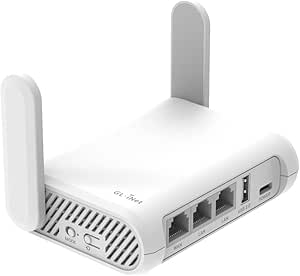 | Best Lightweight Dual-Band Pick | Wi-Fi standard: Wi-Fi 5 (802.11a/b/g/n/ac) | Bands: Dual-band, 2.4 GHz and 5 GHz | Maximum wireless rate: 1200 Mbps | VIEW ON AMAZON | See Our Full Breakdown |
| GL.iNet GL-MT300N-V2 Mango Portable Travel Wi-Fi Router |  | Best Budget Basics | Wireless standard: 802.11b/g/n | Frequency: 2.4 GHz | Listed data rate: 300 Mbps | VIEW ON AMAZON | See Our Full Breakdown |
| TP-Link Roam 6 AX3000 Wi-Fi 6 Travel Router |  | Best for Large Device Groups | Model: TL-WR3012X | Wi-Fi standard: Wi-Fi 6 (802.11ax) | Wireless speeds: Up to 2,402 Mbps at 5 GHz and 574 Mbps at 2.4 GHz | VIEW ON AMAZON | See Our Full Breakdown |
| GL.iNet GL-MT3000 Beryl AX Wi-Fi 6 Travel Router | 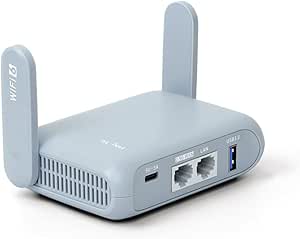 | Best for VPN and Network Control | Wi-Fi standard: Wi-Fi 6 (802.11ax) | Wireless bands and speeds: 2.4 GHz: 574 Mbps; 5 GHz: 2,402 Mbps | Ethernet ports: 2.5G WAN and 1 Gbps LAN | VIEW ON AMAZON | See Our Full Breakdown |
| Ubiquiti UniFi UTR Travel Router |  | Best for UniFi Users | Wireless standard: Wi-Fi 5 (802.11ac), dual-band | Dimensions: 3.78 x 2.6 x 0.5 in | Weight: 4.8 oz | VIEW ON AMAZON | See Our Full Breakdown |
| ASUS RT-BE58 Go WiFi 7 Dual-Band Travel Router |  | Best for Wi-Fi 7 and Mobile Tethering | Wi-Fi standard: Wi-Fi 7 (802.11be) | Frequency bands: Dual-band, 2.4 GHz and 5 GHz | Maximum combined speed: Up to 3.6 Gbps | VIEW ON AMAZON | See Our Full Breakdown |
| cruise travel router | Model |
|---|---|
| TP-Link Roam 6 AX3000 Dual-Ban | TL-WR3002X |
| GL.iNet Slate AX Wi-Fi 6 Trave | GL-AXT1800 |
| GL.iNet GL-BE3600 Slate 7 Wi-F | GL-BE3600 Slate 7 |
| TP-Link Roam 6 AX1500 Wi-Fi 6 | Roam 6 AX1500 |
| TP-Link Roam 6 AX1500 Portable | TL-WR1502X |
| GL.iNet GL-A1300 Slate Plus Po | — |
| Roam 7 BE3600 Wi-Fi 7 Portable | — |
| TP-Link N300 Wireless Nano Tra | TL-WR802N |
| GL.iNet Beryl 7 Dual-Band Wi-F | GL-MT3600BE |
| GL.iNet GL-SFT1200 Opal AC1200 | — |
| GL.iNet GL-MT300N-V2 Mango Por | — |
| TP-Link Roam 6 AX3000 Wi-Fi 6 | TL-WR3012X |
| GL.iNet GL-MT3000 Beryl AX Wi- | — |
| Ubiquiti UniFi UTR Travel Rout | — |
| ASUS RT-BE58 Go WiFi 7 Dual-Ba | — |
More Details on Our Top Picks
TP-Link Roam 6 AX3000 Dual-Band Wi-Fi 6 Travel Router (TL-WR3002X)
For a cruise ship connection that requires a captive-portal login, I’d put the Roam 6 AX3000 first: it can repeat public Wi-Fi into a private network, so your devices can connect through one router rather than each needing a separate setup. Its USB-C power suits portable travel use, while the 2.5 Gbps WAN/LAN port gives it a stronger wired option than the Roam 6 AX1500. Dual-band Wi-Fi 6 and support for OpenVPN and WireGuard add flexibility for travelers with several devices or a preferred VPN setup. The tradeoff is that it does not provide internet on its own and cannot use a SIM or eSIM; ship Wi-Fi access is still required. Unlike the OpenWrt-based GL.iNet Slate AX, it also offers no OpenWrt customization.
Pros:- Can turn public Wi-Fi into a private network and supports captive portal authentication.
- Supports OpenVPN and WireGuard client and server connections.
- Includes a 2.5 Gbps WAN/LAN port and a separate 1 Gbps LAN port.
- USB-C power and USB or microSD file sharing add travel flexibility.
Cons:- Requires an external internet connection and does not support SIM or eSIM.
- Does not support OpenWrt, limiting firmware customization compared with the GL.iNet Slate AX.
- Its multi-gigabit port is useful only when the upstream connection and connected equipment can take advantage of it.
Best for: Cruise travelers who need to share a ship or other public Wi-Fi login across several personal devices and want a faster wired port.
Not ideal for: Travelers who need built-in cellular internet, OpenWrt customization, or the simplest low-cost setup for only a few devices.
- Model:TL-WR3002X
- Wi-Fi:Wi-Fi 6, dual-band
- Wireless class:AX3000
- Maximum wireless speeds:2402 Mbps (5 GHz); 574 Mbps (2.4 GHz)
- Ethernet:1 × 2.5 Gbps WAN/LAN; 1 × 1 Gbps LAN
- VPN protocols:OpenVPN, WireGuard, PPTP, L2TP
- Power:USB-C; 5V PD source
- Dimensions:4.1 × 3.5 × 1.1 inches
Our verdict“Choose the Roam 6 AX3000 if sharing ship Wi-Fi across devices and having a 2.5 Gbps wired port matter more than cellular backup or OpenWrt.”
GL.iNet Slate AX Wi-Fi 6 Travel Router with VPN
The GL.iNet Slate AX suits travelers who want more control over their network than the TP-Link Roam 6 AX1500 provides. Its OpenWrt-based firmware allows deeper configuration, and the configurable physical switch can make a selected function easier to access once set up. For ship Wi-Fi sharing, it can repeat a public connection into a private network, while OpenVPN and WireGuard support gives VPN-focused travelers another layer of choice. The stated VPN speeds are useful context: up to 500 Mbps for OpenVPN and 550 Mbps for WireGuard, though actual results depend on the connection and settings. The downsides are the extra setup and a switch that has no assigned function by default. Public Wi-Fi sessions with time limits may also require reconnecting the router.
Pros:- OpenWrt-based firmware supports deeper network configuration.
- Repeats public Wi-Fi to create a private network for connected devices.
- Supports OpenVPN and WireGuard, with stated speeds up to 500 Mbps and 550 Mbps respectively.
- USB storage can be shared through SAMBA and WebDAV.
Cons:- The physical toggle switch must be configured before it has a function.
- Public Wi-Fi time limits can require reconnecting the router after a session expires.
- Its Wi-Fi 6 speeds are lower on paper than the Wi-Fi 7 GL-BE3600 Slate 7.
Best for: Technically confident cruise travelers who want OpenWrt controls, VPN options, and a private network shared from public ship Wi-Fi.
Not ideal for: Beginners who want a minimal setup, or travelers who prefer a touchscreen and newer Wi-Fi 7 hardware such as the Slate 7.
- Model:GL-AXT1800
- Wi-Fi:Wi-Fi 6, dual-band
- Combined data rate:Up to 1800 Mbps
- Maximum connected devices:120
- VPN protocols:OpenVPN and WireGuard
- Stated VPN speeds:Up to 500 Mbps (OpenVPN); 550 Mbps (WireGuard)
- Operating system:OpenWrt 21.02
- Power:5 V, Type-C
Our verdict“Pick the Slate AX if firmware control and VPN flexibility matter more than plug-and-play simplicity or a touchscreen.”
GL.iNet GL-BE3600 Slate 7 Wi-Fi 7 Travel Router with Touchscreen and Dual 2.5G Ethernet
The GL-BE3600 Slate 7 is the feature-heavy choice for travelers who want a capable router in a portable format, rather than the leaner approach of the TP-Link Roam 6 AX1500. Its touchscreen can show network status, scan Wi-Fi QR codes, and control selected features, which may make quick checks easier without opening an admin page. Two 2.5G Ethernet ports and OpenWrt 23.05 give it more wired capacity and configuration potential than the GL.iNet Slate AX. For a cruise, it can create a private network from available ship internet, but it still needs that external connection. VPN performance differs by protocol: the stated ceiling is 100 Mbps for OpenVPN and 540 Mbps for WireGuard. The 12 V DC power input is less flexible than the USB-C power used by the other picks.
Pros:- Wi-Fi 7 and dual 2.5G Ethernet ports provide newer wireless and wired connectivity.
- Touchscreen displays network status and provides selected controls.
- OpenWrt 23.05 supports customization and plugin installation.
- Includes OpenVPN and WireGuard client and server support.
Cons:- Requires a 12 V DC power input rather than the USB-C power used by the other models here.
- Stated VPN speed is limited to 100 Mbps for OpenVPN and 540 Mbps for WireGuard.
- The touchscreen toggle button has no function until configured.
Best for: Cruise travelers who want Wi-Fi 7, OpenWrt customization, a touchscreen, and dual 2.5G ports in one travel router.
Not ideal for: Travelers prioritizing USB-C or power-bank convenience, or those who rely on faster OpenVPN throughput.
- Model:GL-BE3600 Slate 7
- Wi-Fi:Wi-Fi 7, dual-band
- Wireless speeds:688 Mbps (2.4 GHz); 2882 Mbps (5 GHz)
- Ethernet:2 × 2.5G ports (1 WAN, 1 LAN)
- VPN support:OpenVPN and WireGuard client and server
- Maximum stated VPN speeds:100 Mbps (OpenVPN); 540 Mbps (WireGuard)
- Operating system:OpenWrt 23.05
- Power:12 V DC
Our verdict“Choose the Slate 7 if you want premium Wi-Fi 7 features and dual 2.5G ports, and can accommodate its 12 V power requirement.”
TP-Link Roam 6 AX1500 Wi-Fi 6 Travel Router
The Roam 6 AX1500 is the straightforward pick for a traveler who wants to share a public connection without the extra hardware focus of the AX3000 model. It supports router, access point, repeater, and client modes, along with OpenVPN and WireGuard, so it can adapt to different lodging or ship network setups. USB-C power also makes it easier to pair with a compatible power source while traveling. Compared with the TL-WR1502X, its listed details are less explicit about hotspot mode and USB phone tethering, while the AX3000 adds a 2.5 Gbps WAN/LAN port and higher stated wireless capacity. Its stated limit of 60 connected devices is ample for many individual travelers, but it is the least compelling option here for a large group or demanding wired setup. It also needs an external internet source.
Pros:- Repeater mode can turn public Wi-Fi into a private network.
- Supports router, access point, repeater, and client modes.
- OpenVPN and WireGuard support provide VPN options.
- USB-C power supports portable travel setups.
Cons:- Requires an external internet source and has no SIM or eSIM connectivity listed.
- Does not support OpenWrt.
- Its 1 Gbps wired ports offer less capacity than the Roam 6 AX3000’s 2.5 Gbps WAN/LAN port.
Best for: Solo cruise travelers or couples who want a compact Wi-Fi 6 router for sharing public Wi-Fi and do not need advanced firmware controls.
Not ideal for: Large groups, travelers seeking OpenWrt, or buyers who need the AX3000 model’s 2.5 Gbps WAN/LAN port.
- Model:Roam 6 AX1500
- Wi-Fi:Wi-Fi 6, dual-band
- Maximum wireless speeds:1201 Mbps (5 GHz); 300 Mbps (2.4 GHz)
- Maximum connected devices:Up to 60
- Wired ports:1 Gbps WAN/LAN; 1 Gbps LAN
- VPN support:OpenVPN and WireGuard
- Operating modes:Router, access point, repeater, client
- Power:USB-C; 5V/3A PD source
Our verdict“Choose the Roam 6 AX1500 for compact, uncomplicated sharing of public Wi-Fi, but step up to the AX3000 for higher wired capacity.”
TP-Link Roam 6 AX1500 Portable Wi-Fi 6 Travel Router (TL-WR1502X)
The TL-WR1502X stands out for the range of ways it can receive or distribute a connection: it supports router, hotspot, access point, repeater, and client modes, plus internet from public Wi-Fi, Ethernet, or USB phone tethering. That makes it a practical fit for a cruise traveler who may switch between ship Wi-Fi and a tethered phone, though neither option means the router provides internet independently. Compared with the other TP-Link AX1500 Roam 6, this model explicitly lists USB phone tethering and hotspot mode; the GL.iNet Slate AX is the stronger match for travelers wanting OpenWrt controls. Its two gigabit Ethernet ports and compact dimensions are useful, but its internal antennas and lack of OpenWrt limit appeal for buyers seeking advanced customization. It also cannot use a SIM or eSIM directly.
Pros:- Supports router, hotspot, access point, repeater, and client modes.
- Can use public Wi-Fi, Ethernet, or USB phone tethering as an internet source.
- Two gigabit Ethernet ports support wired connections.
- Compact body and USB-C power suit portable use.
Cons:- Requires an external internet source and cannot use a SIM or eSIM directly.
- Does not support OpenWrt, unlike the GL.iNet Slate AX and Slate 7.
- Its Wi-Fi 6 hardware lacks the newer Wi-Fi 7 generation offered by the Slate 7.
Best for: Cruise travelers who may alternate between ship Wi-Fi, Ethernet, and USB-tethered phone internet and want several operating modes.
Not ideal for: Travelers who need built-in SIM or eSIM service, OpenWrt customization, or Wi-Fi 7 features.
- Model:TL-WR1502X
- Wi-Fi:Wi-Fi 6, dual-band
- Maximum Wi-Fi speed:1500 Mbps (1201 Mbps at 5 GHz; 300 Mbps at 2.4 GHz)
- Operating modes:Router, hotspot, access point, repeater, client
- Ports:2 gigabit Ethernet; 1 USB 2.0; USB-C power
- Dimensions:4.09 × 3.54 × 1.10 inches
- Power input:5V/3A via USB-C
- Security protocols:WPA-PSK, WPA2-Enterprise, WPA3
Our verdict“Choose the TL-WR1502X if connection-mode flexibility, especially USB phone tethering, matters more than cellular support or firmware customization.”
GL.iNet GL-A1300 Slate Plus Portable Dual-Band Travel Router
For a cruise ship connection, the Slate Plus is a strong fit when I want to connect the router to the ship’s Wi-Fi and share that connection across my own devices. Its OpenVPN and WireGuard support, configurable routing policies, and kill switch offer more control over which traffic uses a VPN than the TP-Link TL-WR802N. WireGuard can reach up to 170 Mbps according to the listed specs, while OpenVPN is capped at 28 Mbps, so the protocol choice affects performance. The guest network and USB network storage add useful sharing options, though storage requires an external drive. Compared with the newer Wi-Fi 7 Roam 7, this model is less focused on peak wireless speed and more on configurable networking. I’d choose it for ship travel when VPN controls matter more than the latest Wi-Fi generation; setup takes more effort, and its physical toggle needs manual configuration.
Pros:- Supports OpenVPN and WireGuard clients and servers
- VPN routing policies and a kill switch allow traffic to be directed deliberately
- Guest Wi-Fi and SAMBA/WebDAV storage add sharing options
- Three ports include a gigabit LAN connection
Cons:- Maximum listed VPN speeds vary widely: 28 Mbps for OpenVPN and 170 Mbps for WireGuard
- The physical toggle has no assigned function until configured
- Package includes a US-plug power adapter
Best for: Cruisers who want configurable VPN routing, a kill switch, and a shared private network for several personal devices
Not ideal for: Travelers seeking the simplest plug-in setup, the newest Wi-Fi generation, or a non-US power adapter in the box
- Wireless standard:Wi-Fi 5 (802.11a/b/g/n/ac)
- Bands:Dual-band, 2.4 GHz and 5 GHz
- Maximum wireless rate:400 Mbps (2.4 GHz) + 867 Mbps (5 GHz)
- VPN protocols:OpenVPN and WireGuard
- Maximum VPN speed:28 Mbps (OpenVPN); 170 Mbps (WireGuard)
- Ports:3; gigabit LAN
- Network storage:SAMBA and WebDAV
- Dimensions and weight:118 × 84 × 33 mm; 429 g
Our verdict“Choose the Slate Plus for a cruise ship setup where VPN routing control matters more than Wi-Fi 7 speed or beginner-friendly setup.”
Roam 7 BE3600 Wi-Fi 7 Portable Travel Router Dual-Band, 2.5G Port, USB 3.0
The Roam 7 is the speed-and-modes pick for travelers who want one router to handle more than a single hotel-style connection. Its Wi-Fi 7 dual-band radio, 2.5 Gbps WAN port, and USB 3.0 give it a broader connection toolkit than the older Wi-Fi 5 TP-Link TL-WR802N. On a cruise, the router, hotspot, or client modes may help adapt to different ways of getting online, but the product data does not establish that it bypasses a ship’s access rules or captive portal. It also lacks the 6 GHz band, so Wi-Fi 7 here does not mean tri-band operation. Compared with the GL.iNet Beryl 7, it lists more operating modes and USB tethering, while Beryl 7 offers more detailed VPN and security features. I’d favor this model for flexible connections, not for buyers who want security controls clearly spelled out.
Pros:- Wi-Fi 7 supports listed rates up to 2882 Mbps on 5 GHz
- Multiple modes include router, hotspot, access point, repeater, and client
- 2.5 Gbps WAN and USB 3.0 provide flexible wired and tethering options
- Listed support for up to 90 devices
Cons:- No 6 GHz band
- Requires external power through USB-C or a power bank
- Advanced security setup may require technical knowledge
Best for: Cruisers and remote workers who want a portable Wi-Fi 7 router with several connection modes and a fast wired WAN option
Not ideal for: Buyers who need 6 GHz Wi-Fi, a built-in battery, or clearly specified advanced VPN controls
- Wi-Fi technology:Wi-Fi 7
- Bands:Dual-band
- Maximum listed speed:2882 Mbps (5 GHz); 688 Mbps (2.4 GHz)
- WAN port:2.5 Gbps
- LAN port:1 Gbps
- USB port:USB 3.0
- Supported modes:Router, hotspot, access point, range extender, client
- Device support:Up to 90 devices
Our verdict“Pick the Roam 7 if you want Wi-Fi 7 and flexible connection modes for ship and shore use, and can supply external power.”
TP-Link N300 Wireless Nano Travel Router (TL-WR802N)
The TL-WR802N is the straightforward choice when my cruise setup calls for a tiny router and basic private Wi-Fi rather than high throughput or advanced privacy controls. It supports five operating modes, including client and WISP, and can draw power from a wall adapter or USB port—useful when packing space is tight. Its 2.4 GHz-only Wi-Fi and 10/100 Mbps Ethernet port are substantial limits beside the dual-band GL.iNet GL-SFT1200 Opal or the Wi-Fi 7 Roam 7. That older, slower design can still suit basic browsing and connecting a small number of devices, but it leaves less room for demanding streaming or busy networks. The listed security options stop at WPA2-PSK, with older protocols also present, and there are no VPN features specified. I’d choose it for simplicity and portability, not for a security-focused ship network or fast shared use.
Pros:- Pocket-sized design suits limited luggage space
- Can be powered from a wall adapter or USB port
- Five modes include router, client, repeater, and WISP
- Pre-encryption sets an initial network name and password
Cons:- 2.4 GHz-only Wi-Fi is less flexible than the dual-band GL-SFT1200 Opal
- Single 10/100 Mbps WAN/LAN port limits wired throughput and connections
- No VPN support is listed, and security options are less current than WPA3 models
Best for: Light-packing cruisers who need a small router for basic browsing and prefer simple USB or wall power
Not ideal for: Travelers who want dual-band Wi-Fi, VPN support, faster wired connections, or a router for demanding streaming
- Model:TL-WR802N
- Wi-Fi speed:Up to 300 Mbps
- Frequency band:2.4 GHz
- Wireless standards:IEEE 802.11n, 802.11g, 802.11b
- Operating modes:Router, access point, client, repeater, WISP
- Ethernet:1 × 10/100 Mbps WAN/LAN
- Power:5 V/1 A; wall adapter or USB
- Antennas:2 fixed, on-board antennas
Our verdict“Choose the TL-WR802N for a compact, basic ship-travel network, but skip it if you need dual-band performance or VPN features.”
GL.iNet Beryl 7 Dual-Band Wi-Fi 7 Travel Router
The Beryl 7 is the most capable choice here for cruisers who prioritize VPN throughput and wired flexibility over minimal setup. Its dual 2.5 GbE ports make it easier to connect a wired source and a separate LAN device, while Wi-Fi 7 and support for up to 120 connected devices suit a shared network. The listed VPN speeds—up to 1100 Mbps for WireGuard and 1000 Mbps for OpenVPN-DCO—are far beyond the Slate Plus figures, though real performance depends on the service and connection. OpenWrt, WPA3, encrypted DNS, and VPN cascading give advanced users more controls than the simpler TP-Link TL-WR802N. The tradeoff is complexity: VPN services need a separate subscription, and the configurable switch takes setup. For a ship, I’d favor this when a VPN-focused, wired-capable hub is worth the extra configuration, rather than when a tiny basic router will do.
Pros:- Wi-Fi 7 with listed support for up to 120 connected devices
- Two 2.5 GbE ports provide fast WAN and LAN connections
- High listed WireGuard and OpenVPN-DCO speeds
- OpenWrt, WPA3, encrypted DNS, and VPN cascading support advanced configuration
Cons:- VPN services require a separate active subscription
- The physical toggle must be configured before it works as desired
Best for: Cruisers sharing a network across many devices who want fast VPN options, advanced controls, and dual 2.5 GbE ports
Not ideal for: Travelers who want a minimal setup, have no use for advanced VPN features, or expect VPN service to be included
- Model:GL-MT3600BE
- Wi-Fi generation and bands:Wi-Fi 7, dual-band 2.4 GHz and 5 GHz
- Wireless speed:688 Mbps (2.4 GHz) + 2882 Mbps (5 GHz)
- Ethernet:2 × 2.5 GbE (1 WAN, 1 LAN)
- VPN protocols:WireGuard and OpenVPN
- Maximum listed VPN speed:Up to 1100 Mbps (WireGuard); up to 1000 Mbps (OpenVPN-DCO)
- Maximum connected devices:120
- Security:WPA3, DNS over HTTPS, DNS over TLS
- USB:USB 3.0
Our verdict“Choose the Beryl 7 for a feature-rich cruise network with fast VPN and wired connections, provided you are comfortable configuring it.”
GL.iNet GL-SFT1200 Opal AC1200 Dual-Band Travel Router
At 145 g, the Opal gives cruise travelers a useful middle ground between the single-band TL-WR802N and the more advanced Slate Plus. Its dual-band Wi-Fi can separate devices across 2.4 GHz and 5 GHz, while three gigabit ports help when a cabin setup includes wired equipment. It also supports OpenVPN and WireGuard and can turn public Wi-Fi into a private network, making it better suited to shared ship access than a basic pocket router without listed VPN support. The compromise is that it uses Wi-Fi 5, not the Wi-Fi 7 generation found in the Roam 7 and Beryl 7, and its VPN performance figures are not provided here. Retractable antennas help with packing, but the configurable toggle needs setup and easytethering is not supported. I’d pick it for lighter luggage and practical dual-band features, not for the highest-capacity or most advanced network.
Pros:- Lightweight 145 g design with retractable antennas
- Dual-band Wi-Fi supports listed rates up to 1200 Mbps
- Two gigabit LAN ports and one gigabit WAN port
- OpenVPN and WireGuard support for a private network from public Wi-Fi
Cons:- Wi-Fi 5 is an older generation than the Roam 7 and Beryl 7
- Physical toggle requires configuration in the admin panel
- Does not support easytethering, and actual wireless speeds vary by network
Best for: Cruisers who want a lightweight dual-band router with VPN support and gigabit wired ports without stepping up to a Wi-Fi 7 model
Not ideal for: Travelers who need Wi-Fi 7, easytethering, or a router with specified high VPN throughput
- Wi-Fi standard:Wi-Fi 5 (802.11a/b/g/n/ac)
- Bands:Dual-band, 2.4 GHz and 5 GHz
- Maximum wireless rate:1200 Mbps
- 2.4 GHz and 5 GHz rates:Up to 300 Mbps and 867 Mbps
- Ports:2 Gigabit LAN, 1 Gigabit WAN
- VPN protocols:OpenVPN and WireGuard
- Weight:145 g
- Antennas:2 retractable
- Operating system:OpenWrt
Our verdict“Choose the Opal for a light, dual-band cruise router with VPN and gigabit ports, but look elsewhere for Wi-Fi 7 or easytethering.”
GL.iNet GL-MT300N-V2 Mango Portable Travel Wi-Fi Router
The Mango is the simplest fit here for a cruise traveler who mainly wants to turn a wired cabin connection or public Wi-Fi into a private network. Its USB power options make it easy to run from a power bank or laptop, and the small 39 g body takes little packing space. Compared with the newer GL.iNet Beryl AX, however, it is a much more basic choice: its Wi-Fi is limited to 2.4 GHz, its Ethernet ports top out at 100 Mbps, and its listed wireless rate is 300 Mbps. OpenWrt and a pre-installed OpenVPN client offer more customization than its size suggests, but this is not the pick for heavy streaming or many devices competing for bandwidth. I’d choose it for light, practical ship connectivity, not speed.
Pros:- Can create a private Wi-Fi network from public wireless or wired internet
- Very light at 39 g and small enough for a compact travel kit
- OpenWrt and a pre-installed OpenVPN client support customization and VPN use
- Can draw power from USB, a power bank, or a 5V/2A adapter
Cons:- 2.4 GHz only, with a listed wireless rate of 300 Mbps
- Ethernet ports have 100 Mbps bandwidth
- Power adapter is sold separately
Best for: Cruisers who want a lightweight way to share a wired connection or public Wi-Fi with a few devices and value OpenWrt flexibility.
Not ideal for: Travelers planning bandwidth-heavy streaming or expecting fast performance from several devices; its single 2.4 GHz band and 100 Mbps Ethernet are limiting.
- Wireless standard:802.11b/g/n
- Frequency:2.4 GHz
- Listed data rate:300 Mbps
- Ethernet ports:2; LAN bandwidth 100 Mbps
- Operating system:OpenWrt
- VPN:Pre-installed OpenVPN client
- Power input:5 V
- Weight:39 g (1.41 oz)
Our verdict“Choose the Mango for a low-complexity, easy-to-pack private network on a ship, but skip it if you need modern dual-band speeds.”
TP-Link Roam 6 AX3000 Wi-Fi 6 Travel Router
For families or groups sharing ship internet, the Roam 6 AX3000 stands out for its stated capacity of up to 80 connected devices and its flexible router, access point, repeater, and client modes. Dual-band Wi-Fi 6 and OpenVPN or WireGuard support give it a more current feature set than the 2.4 GHz-only Mango, while USB-C power can come from a compatible 5V/3A source. The two gigabit Ethernet ports and USB 3.0 port also give it more connection options than the Ubiquiti UniFi UTR. The tradeoff is that it does not support OpenWrt, so it is less suited to buyers who want firmware-level customization. Its advertised device count, speed, and coverage are also dependent on the actual network and surroundings—important limits when ship Wi-Fi is the bottleneck.
Pros:- Supports router, access point, repeater, and client modes for different ship and hotel networks
- Dual-band Wi-Fi 6 with OpenVPN and WireGuard support
- Two gigabit Ethernet ports and a USB 3.0 port
- USB-C power supports compatible 5V/3A sources
Cons:- Does not support OpenWrt
- Actual speed, coverage, and device capacity vary with the network and environment
- At 0.4 lb, it is heavier than the Mango
Best for: Families or cruise groups who want to share one available connection across many phones, tablets, and laptops, with several operating modes.
Not ideal for: OpenWrt enthusiasts or travelers who need guaranteed speeds and coverage regardless of the ship’s internet connection.
- Model:TL-WR3012X
- Wi-Fi standard:Wi-Fi 6 (802.11ax)
- Wireless speeds:Up to 2,402 Mbps at 5 GHz and 574 Mbps at 2.4 GHz
- Maximum connected devices:Up to 80
- Ports:Two gigabit Ethernet, one USB 3.0, one USB-C power
- VPN protocols:OpenVPN and WireGuard
- Power input:USB-C, 5V/3A
- Dimensions and weight:4.7 x 3.6 x 1.3 in; 0.4 lb
Our verdict“Pick the Roam 6 AX3000 if your cruise group needs flexible sharing for many devices and values easy USB-C power over OpenWrt control.”
GL.iNet GL-MT3000 Beryl AX Wi-Fi 6 Travel Router
The Beryl AX is the strongest match in this group for cruise travelers who want detailed control over their connection, not just a basic private hotspot. It pairs dual-band Wi-Fi 6 with OpenWrt 21.02, OpenVPN and WireGuard client and server modes, WPA3, and encrypted DNS. Its 2.5G WAN port, gigabit LAN, and USB 3.0 connection give it a more capable wired setup than the Mango, while the Roam 6 AX3000 is the more straightforward choice for buyers prioritizing a stated 80-device capacity. The Beryl AX is not free of limits: VPN throughput is capped at the stated 150 Mbps for OpenVPN and 300 Mbps for WireGuard, and the physical toggle needs configuration in the admin panel before it works as desired. VPN services may also require a separate active subscription.
Pros:- Dual-band Wi-Fi 6 with listed speeds up to 2,402 Mbps at 5 GHz
- OpenWrt 21.02 supports network customization
- OpenVPN and WireGuard work in client and server modes
- Includes a 2.5G WAN port, gigabit LAN, WPA3, and encrypted DNS
Cons:- Maximum VPN speeds are listed as 150 Mbps for OpenVPN and 300 Mbps for WireGuard
- Physical toggle must be configured in the admin panel before use
- VPN services may require an active subscription
Best for: Cruisers comfortable configuring a router who want OpenWrt, multiple VPN modes, and stronger wired ports for a private ship network.
Not ideal for: Beginners seeking a plug-and-play router or travelers who expect VPN speeds beyond the stated limits.
- Wi-Fi standard:Wi-Fi 6 (802.11ax)
- Wireless bands and speeds:2.4 GHz: 574 Mbps; 5 GHz: 2,402 Mbps
- Ethernet ports:2.5G WAN and 1 Gbps LAN
- USB:USB 3.0
- Firmware:OpenWrt 21.02
- VPN protocols:OpenVPN and WireGuard, client and server modes
- Maximum VPN speeds:150 Mbps OpenVPN; 300 Mbps WireGuard
- Security:WPA2-PSK, WPA3, DNS over HTTPS, DNS over TLS
Our verdict“Choose the Beryl AX for configurable VPN protection and capable wired connectivity aboard ship, provided you are willing to manage its settings.”
Ubiquiti UniFi UTR Travel Router
The UniFi UTR makes most sense for travelers already invested in UniFi equipment who want a slim router that can extend that network while away. It also runs in stand-alone mode without a UniFi account, so a cruise traveler can use it independently rather than relying on a home setup. Its two gigabit Ethernet ports and WireGuard support are useful for wired devices and a VPN connection, but its Wi-Fi 5 hardware is a generation behind the Wi-Fi 6 Roam 6 AX3000 and Beryl AX. That difference may matter less for a single traveler with modest bandwidth needs than for a group sharing ship internet. The 4.8 oz design is notably slim, yet the USB-C power adapter is not included, adding a packing task. I’d rank it for UniFi continuity, not maximum wireless capability.
Pros:- Can operate in stand-alone mode without a UniFi account
- Slim 0.5-inch profile is easy to pack
- Two gigabit Ethernet ports support wired connections
- WireGuard and WPA3 support
Cons:- Uses Wi-Fi 5 rather than the Wi-Fi 6 radios in the Roam 6 AX3000 and Beryl AX
- USB-C power adapter is not included
- Only WireGuard VPN support is listed
Best for: UniFi owners who want to extend familiar network settings while traveling and need two gigabit Ethernet ports in a slim body.
Not ideal for: Cruisers seeking newer Wi-Fi 6 or Wi-Fi 7 features, or anyone who wants a power adapter included in the box.
- Wireless standard:Wi-Fi 5 (802.11ac), dual-band
- Dimensions:3.78 x 2.6 x 0.5 in
- Weight:4.8 oz
- Ports:Two Gigabit Ethernet RJ45
- VPN support:WireGuard
- Security protocols:WPA2 and WPA3
- Power input:USB-C, 5V/2A
- Display:1.14 in
Our verdict“Choose the UniFi UTR if keeping a UniFi setup consistent matters more than having the newest Wi-Fi generation aboard ship.”
ASUS RT-BE58 Go WiFi 7 Dual-Band Travel Router
The ASUS RT-BE58 Go is the most flexible pick here when a cruise traveler wants to bring their own connection as well as share ship or public Wi-Fi. Its public Wi-Fi mode can create a private hotspot, while 4G and 5G tethering offer an alternative when a compatible phone or mobile dongle has service. Wi-Fi 7, USB-C Power Delivery, and AiMesh support make it a broader travel and home-network tool than the UniFi UTR, which is better suited to UniFi users and wired connections. The tradeoff is that only one port is listed, so it offers less wired flexibility than the Beryl AX or TP-Link Roam 6 AX3000. Its high wireless capacity also cannot improve a slow or restricted ship connection; it shares the source connection rather than replacing it.
Pros:- Wi-Fi 7 dual-band support with stated combined speeds up to 3.6 Gbps
- Public Wi-Fi mode can create a private hotspot with VPN features
- Can share 4G or 5G service through a compatible phone or mobile dongle
- USB-C Power Delivery and AiMesh add travel and home-network flexibility
Cons:- Only one port is listed, offering less wired flexibility than the Beryl AX
- Mobile tethering requires a compatible smartphone or mobile dongle
- Wi-Fi 7 capabilities cannot overcome limits in the ship or public internet connection
Best for: Cruisers with a compatible phone or mobile dongle who want Wi-Fi 7, public Wi-Fi sharing, and a backup tethered connection in one router.
Not ideal for: Travelers who need multiple Ethernet connections or do not have a compatible mobile device or dongle for tethering.
- Wi-Fi standard:Wi-Fi 7 (802.11be)
- Frequency bands:Dual-band, 2.4 GHz and 5 GHz
- Maximum combined speed:Up to 3.6 Gbps
- Band speeds:2.4 GHz: up to 688 Mbps; 5 GHz: up to 2,882 Mbps
- Connectivity:Wi-Fi, 4G and 5G tethering
- USB-C power:18 W USB Power Delivery
- LAN port bandwidth:1,000 Mbps
- Security protocols:WPA2 and WPA3
Our verdict“Pick the RT-BE58 Go if you want a Wi-Fi 7 travel router that can share ship Wi-Fi or a compatible mobile connection, and do not need several wired ports.”
How We Picked
I ranked these routers for the realities of cruise travel: joining a captive-portal network, sharing a connection across personal devices, and handling limited cabin space. I weighed setup and management, wireless generation and capacity, useful network controls such as VPN support, port options, portability, and how much capability a typical traveler is likely to use. A router can share access, but it cannot remove ship Wi-Fi limits, guarantee compatibility with a cruise line’s sign-in process, or turn a restricted plan into unrestricted service.
The order favors models that combine practical travel features with capabilities that remain useful on a ship, rather than treating the newest Wi-Fi standard as an automatic win. Wi-Fi 6 and Wi-Fi 7 routers rank ahead of older N300 choices for households with several modern devices, while simpler or less capable models still have a place for lighter use and tight packing needs. I distinguish closely related product names carefully: confirm the exact model and hardware version before buying, since similar labels can refer to different configurations.
Factors to Consider When Choosing Cruise Travel Router
Choosing a router for a cruise is less about chasing maximum speed and more about matching the device to ship-network rules, your group’s habits, and your tolerance for setup. These broader points can help prevent a capable router from becoming an awkward extra in your cabin.
Check the Cruise Line’s Device and Sign-In Rules
Before choosing hardware, check how your cruise line handles device limits, captive portals, and router use. Some networks require a browser sign-in, paid access per device, or periodic reauthentication, and those steps can affect whether a router works smoothly. A travel router may let several devices use one authenticated connection, but it does not grant permission to share access when the plan or ship rules prohibit it. Ask whether personal routers are allowed and whether the sign-in can be completed through a router-connected phone or laptop. This compatibility check often matters more than the difference between Wi-Fi 6 and Wi-Fi 7.
Choose for Device Sharing, Not Advertised Ship Speed
Wireless speed figures describe a router’s local network capability under particular conditions; they do not describe the speed of a cruise ship’s internet service. For a couple checking messages and browsing, a basic model may be enough, while a family connecting phones, tablets, and a laptop may benefit from newer dual-band hardware. Count devices that will be connected at the same time, not every device you own. Also think about what they will do: video calls and large downloads are more demanding than reading or messaging. Paying for a higher wireless tier makes sense when it supports your cabin’s local device needs, not because you expect it to overcome a congested ship connection.
Decide Whether You Need VPN and Advanced Controls
VPN support and configurable routing can help travelers who already use a VPN or want more control over traffic on public networks. They also add setup decisions that may be unnecessary for someone who only wants to connect a phone and tablet. Check whether the VPN service you use is compatible with the router and whether its performance needs fit your activities. A router’s VPN capability does not replace a VPN subscription, and it will not make slow ship internet fast. If you are new to networking, favor a straightforward setup path over a long list of controls you may never touch.
Plan for Captive Portals and Reauthentication
A ship’s sign-in page can be the most frustrating part of using a travel router. Some portals bind access to a device or require periodic acceptance of terms, which can interrupt the shared connection. Bring a phone or laptop for the initial login and learn how to reach the router’s administration page before departure. If the cruise line requires a fresh sign-in after disconnection, confirm that your chosen router lets you repeat that process without resetting the network. Do not assume a feature described as repeater or hotspot mode will automatically handle every ship portal.
Balance Ports, Power, and Packing Space
Extra Ethernet ports, USB connections, and a larger enclosure can help with a more involved cabin setup, but they add bulk and may go unused. For most travelers, the router, its power adapter, and a short charging cable are the pieces that matter day to day. Check how the model is powered and whether the supplied setup suits the outlets and adapters you plan to bring. A compact router is easier to pack, yet the smallest older models may give up modern wireless capacity or convenient controls. Pick the lightest device that still covers your actual connections and setup preferences.
Treat Wi-Fi Generation as a Longevity Choice
Wi-Fi 7 can be appealing if your devices already support it or you want a router to use beyond this cruise, but it is not a guarantee of better ship access. Wi-Fi 6 models already offer a more current fit than the N300-era options for many modern phones and laptops. Older standards can still work for low-demand browsing, so upgrading is not automatically worthwhile for a single light-use trip. Consider how long you expect to keep the router and whether you will use it in hotels, rentals, or other settings after the voyage. A sensible purchase matches both your cruise needs and your likely use at home or on future travel.
Frequently Asked Questions
Can I use a travel router with cruise ship Wi-Fi?
Often, a travel router can connect to a ship’s Wi-Fi and share that connection with your devices, but compatibility depends on the cruise line’s network and rules. Some systems use captive portals, device-based limits, or sign-in steps that need to be repeated. Check the line’s policy before sailing, since router use may be restricted or handled differently by plan. You may need to connect a phone or laptop to complete the initial login. A router does not increase the bandwidth supplied by the ship.
Will one cruise Wi-Fi login cover all my devices through a router?
A travel router can sometimes present several of your devices through one authenticated connection, which may be useful when a plan limits simultaneous devices. Whether that works depends on how the ship identifies users and devices, as well as the plan terms. Some networks may ask for repeated authentication or block sharing. Confirm the policy with the cruise line rather than relying on the router to bypass a device limit. If access is tied to a specific device, you may need to register or reconnect through that device.
Should I buy Wi-Fi 7 for a cruise, or is Wi-Fi 6 enough?
For most cruise travelers, Wi-Fi 6 is a sensible balance of modern device support and travel-focused capability. Wi-Fi 7 may be worthwhile if your phones and laptops support it or you expect to use the router beyond the voyage, but it will not raise the ship’s internet capacity. A cruise network’s speed, congestion, and plan restrictions are usually more influential than the router’s newest wireless features. If you mainly need messaging and browsing, a Wi-Fi 7 premium may go unused. Choose based on your connected devices and future travel plans.
Do I need a VPN-equipped router to use ship Wi-Fi safely?
No, VPN support is optional rather than a requirement for joining a ship’s network. It can be useful if you already subscribe to a VPN and want compatible devices to route traffic through it, but it adds configuration and may affect connection speed. A router with VPN features does not include every VPN service automatically. Check compatibility with your provider and decide whether the added controls are worth managing during a trip. Travelers who want a simple shared connection may prefer to connect their devices directly or use a less complex router setup.
What should I pack to make a cruise travel router work?
Pack the router, its power supply or charging cable, and a phone or laptop that can complete the ship’s sign-in process. A short Ethernet cable can be handy if your cabin or another travel setting offers a wired connection, but do not assume the ship provides one. Save the router’s setup instructions and login details somewhere accessible offline. Before sailing, update its software and learn how to connect to its management page. Also check the cruise line’s current router policy and any connection steps for your specific voyage.
Conclusion
For most cruise travelers, I recommend the GL.iNet Beryl AX as the best overall because its Wi-Fi 6 capability and traveler-oriented controls make a balanced choice for sharing ship access. The TP-Link Roam 6 AX1500 is my best value-style pick for people who want a more modest, modern router and do not need higher-tier features. For a premium, future-facing option, look at the GL.iNet Slate 7 or ASUS RT-BE58 Go if Wi-Fi 7 and extra capability matter beyond this voyage. Beginners may prefer a straightforward TP-Link Roam 6 model, while VPN-focused travelers should compare the Slate AX and Beryl AX. Choose the N300 Nano or Mango only for light use where compact size outweighs newer wireless performance, and check ship rules before bringing any router aboard.
Fall Picks

DJI Osmo Action 4 Essential Combo Waterproof Action Camera
As an affiliate, we earn on qualifying purchases.